Platform overview
Everything around dbt Core, built on dbt Core.
Forewarden does not replace dbt. It runs the same models, tests, ref() and Jinja your project already has, and adds where you write it, how it runs on a schedule, how you trace what depends on what, and who is allowed to touch production.
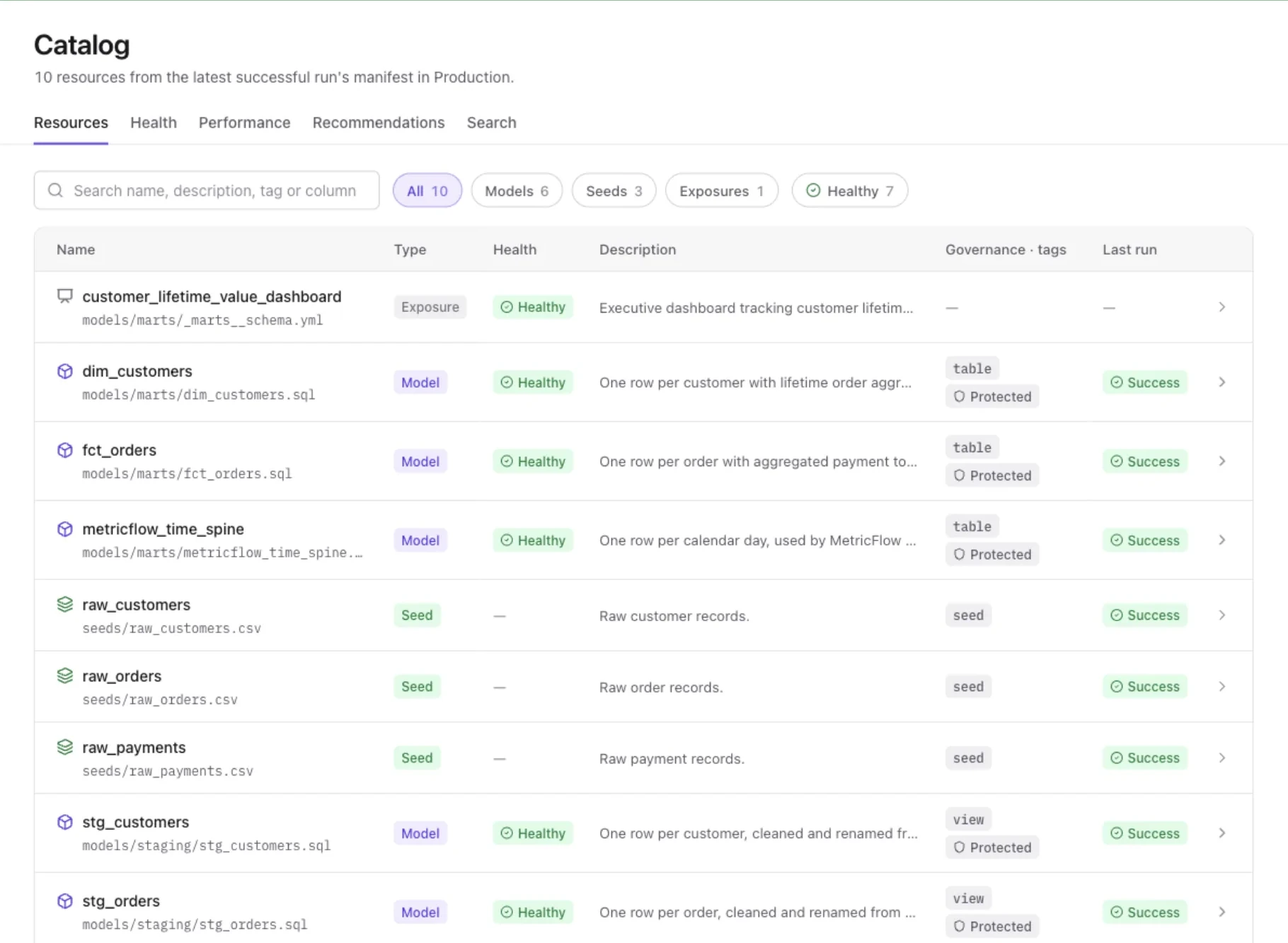
FIG 1·The catalog, from the latest successful production run's manifest.
§ 01/Studio
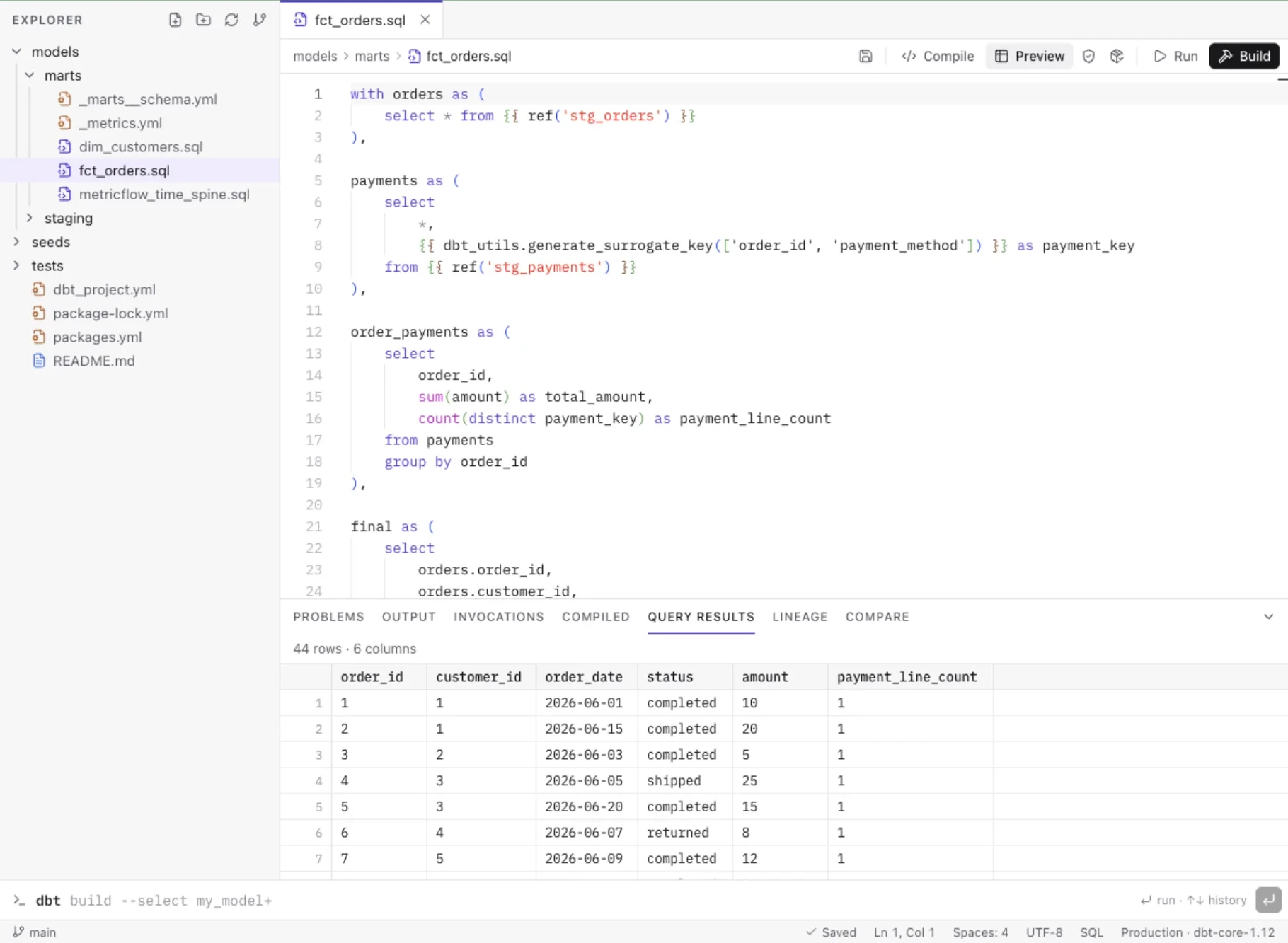
A real editor, not a text box in a browser tab
An explorer scoped to your dbt project, Monaco editor tabs that are restored after a reload, drafts that survive a refresh, and a bottom panel with Problems (SQLFluff), Output, Compiled, Query results, Lineage, Compare and Invocations.
- Command bar: 16 dbt commands (build --select +my_model, test, compile, show, ls, retry and more), with flags checked against an allowlist
- Defer to production: reuse the production manifest so unchanged parents are not rebuilt
- Compare changes: dev vs. production row counts, key matches and per-column differences
- Canvas: build source → join → filter → aggregate visually, then generate a normal model and YAML
- Source control: diff, stage, commit, branch, pull and push, to origin and to every extra remote set to receive commits
§ 02/Orchestration
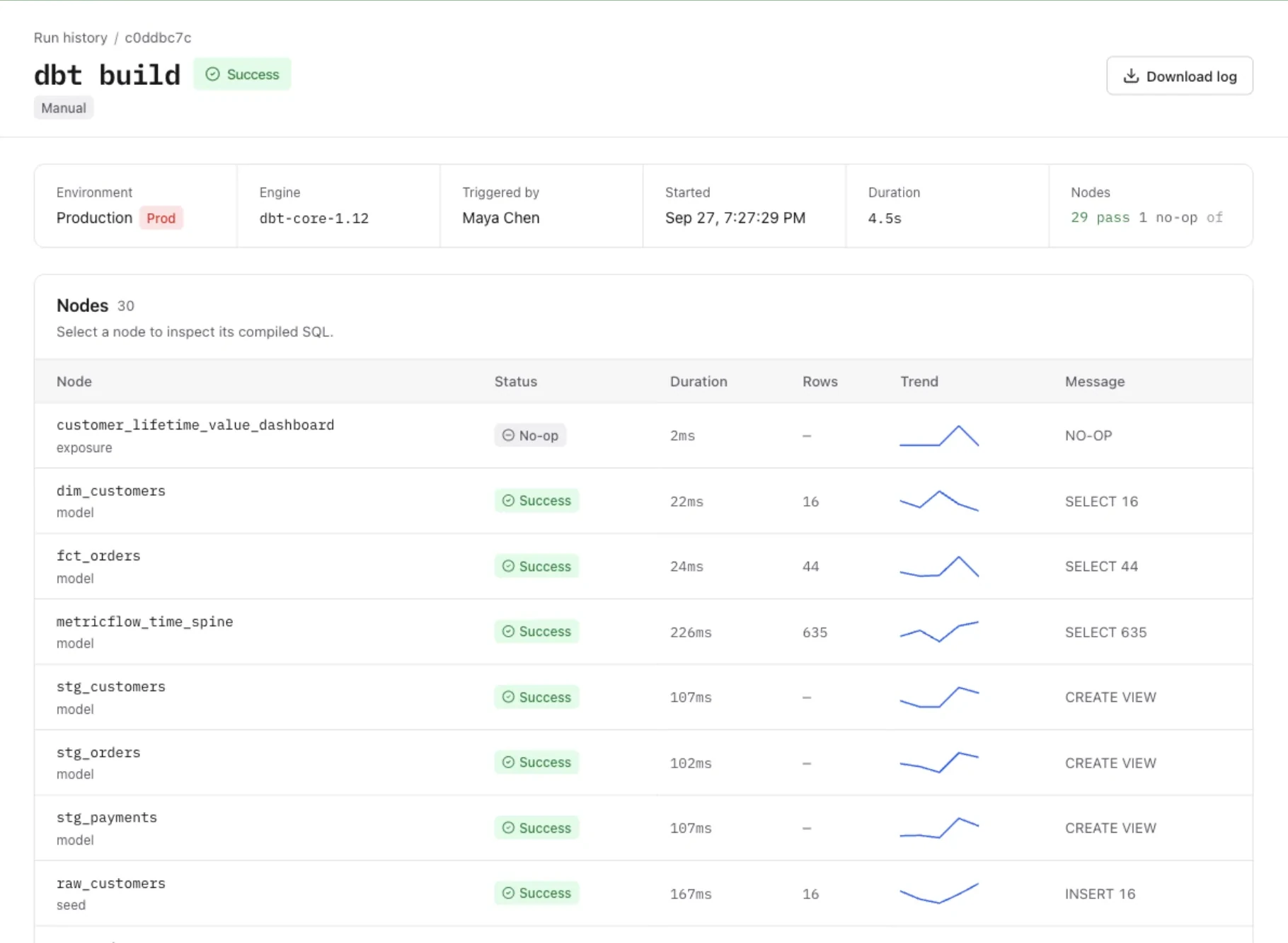
Environments, jobs, Slim CI and a record of every run
Development, staging and production environments each pin a connection, target schema and dbt engine. Deploy jobs run on cron (shown in plain English), with retries, timeouts and chaining. CI jobs start when someone pushes a branch from Forewarden's Git panel. They build state:modified+ into a per-branch schema, deferring to production. When the project has a github.com remote with an access token, the result is posted as a GitHub commit status. Merge jobs run when the default branch is pushed from Forewarden. Pushes made directly to your Git host do not start a job.
- Live SSE logs and per-node status, cancel, filters, git SHA, branch and trigger badges
- Each job run builds from an isolated checkout of the pinned commit
- A newer push to the same branch cancels the CI run it replaces
- When a CI run succeeds, Forewarden compares every model it built with production and attaches row, key and column differences to the run
- Each CI job lists the schema created for every branch and lets a Maintainer drop it
- Each environment runs dbt Core 1.12. The engine page shows what each engine supports and scans the project for dbt v2 readiness
- Notifications per job and per event, with a delivery log and retry
§ 03/Lineage & catalog
Selector syntax you already know, on a graph you can actually read
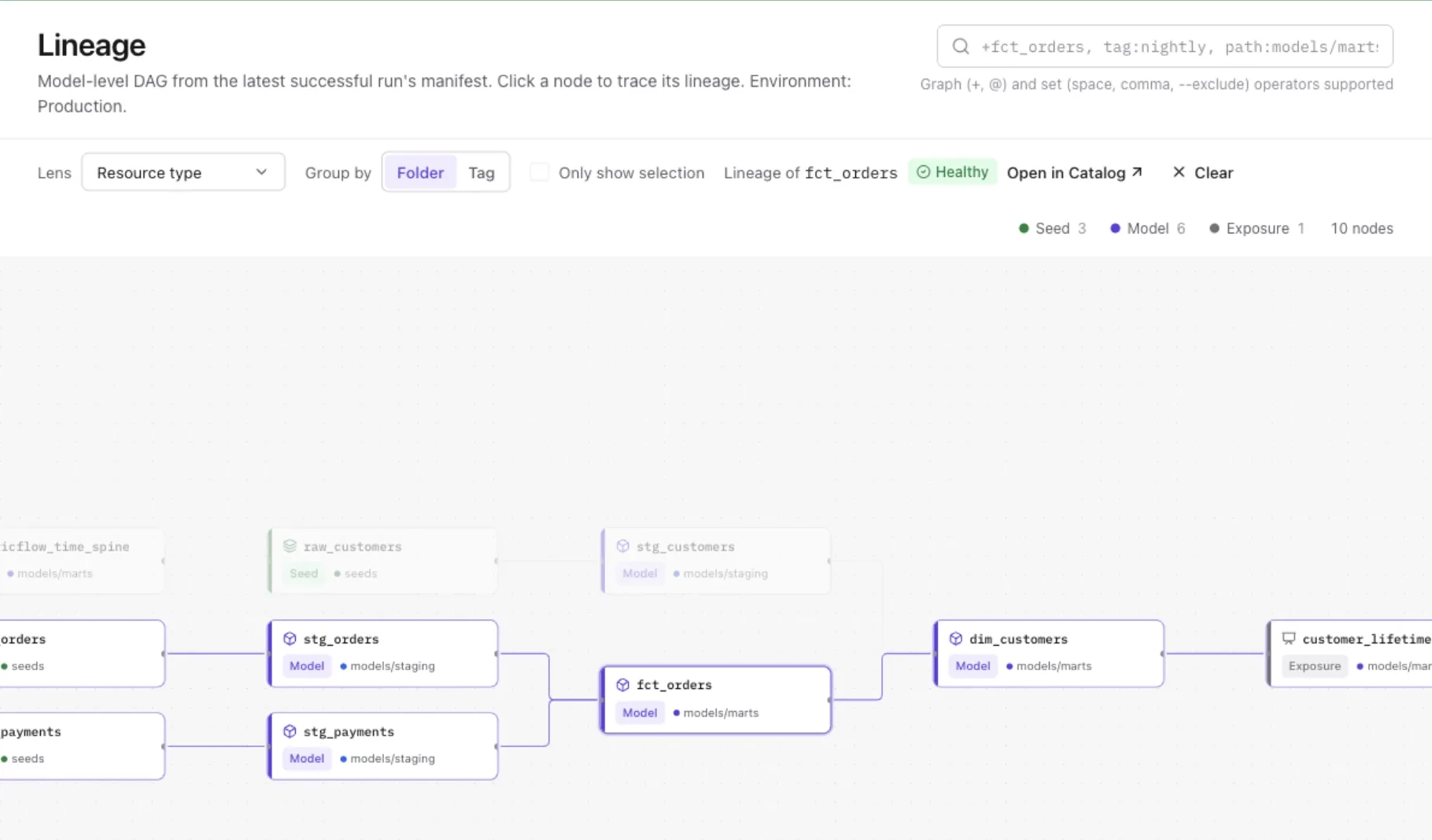
The DAG comes from the latest successful run's manifest. Type +fct_orders, tag:nightly or path:models/marts, combine them with set operators, group by folder or tag, and switch lenses between resource type, materialization, layer and health.
- Catalog: models, sources, seeds, snapshots, exposures and metrics with columns, tests, on-demand profiling, column lineage, code and compare tabs
- Contract, access and version governance badges
- Health (tests, freshness), performance (run-time trends) and 24 recommendation rules
§ 04/Semantic layer
MetricFlow, validated against the warehouse before anyone builds on it
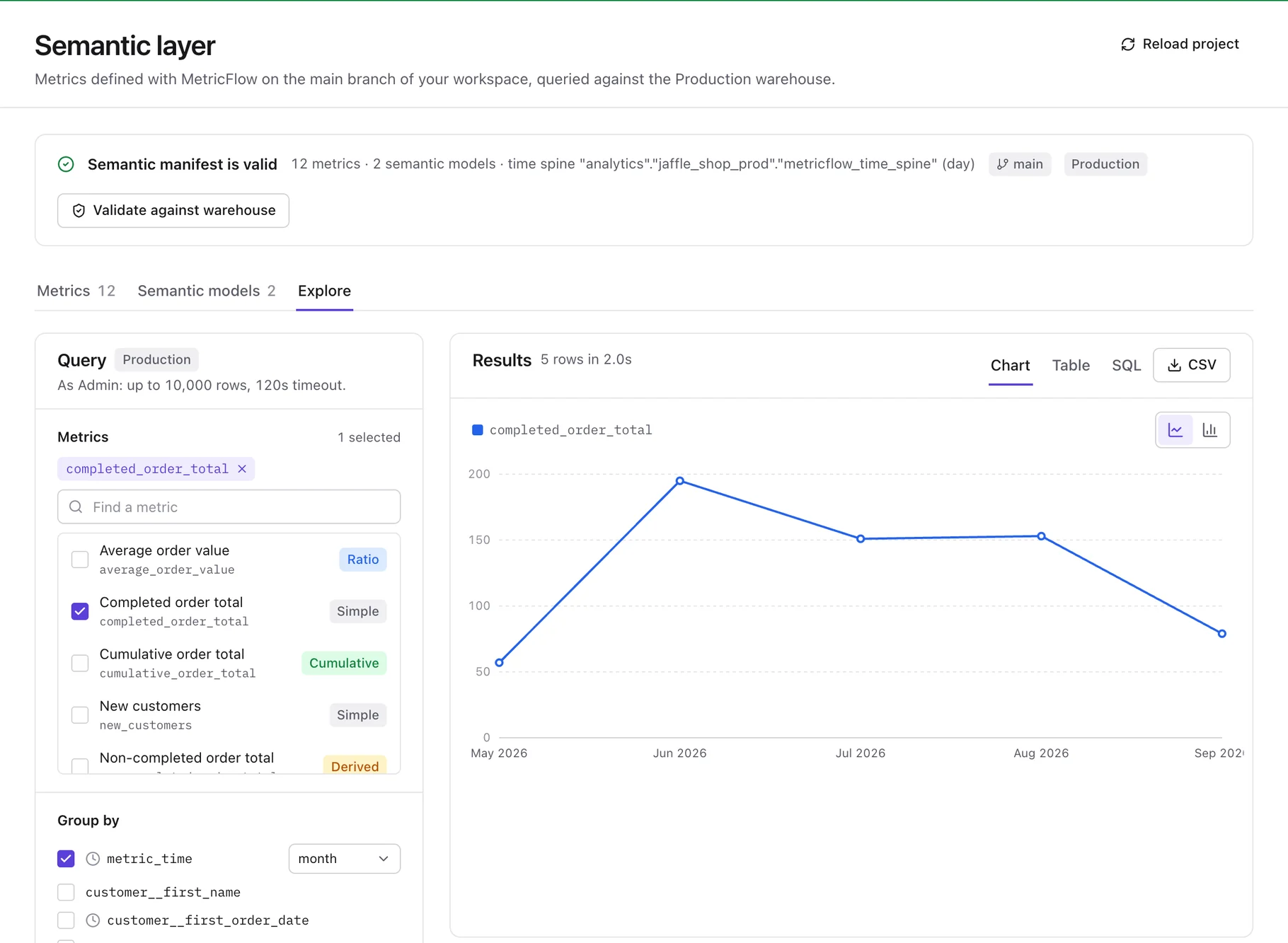
Browse simple, ratio, cumulative and derived metrics with their dimensions and owners. In the explorer, pick metrics, group by time grain and dimensions, add MetricFlow filters, and switch between chart, table and the generated SQL. Export CSV. The same metrics are available to MCP clients and the AI Data Engineer. There is no BI tool connector.
§ 05/AI Data Engineer
An AI data engineer that investigates with read-only tools and shows its evidence
The AI Data Engineer answers questions such as why a run failed or what a model feeds by working through the project the way an engineer would: reading models, lineage, run logs and health, and querying the warehouse read-only. It works inside the current project with your own role, and every step it takes is on the record.
- Where
- A chat page per project (the AI Command Center), and an Explain button on catalog resources that opens it focused on that resource. Each step shows live as it runs.
- Tools
- Read-only and fixed in code: project overview, search, list models, model details, lineage, health, jobs, runs, run logs, read-only SQL, and list and query metrics. No tool can edit files or trigger or cancel runs.
- Scope
- Pinned to the project it was opened in, and run with the user's own project role. System administrators act as admin, as they do everywhere else.
- Row data
- Warehouse rows reach the AI provider only when the user ticks the row-data option and their role can use the SQL workspace. Tool results are passed to the model as data, not as instructions.
- Limits
- At most 8 rounds of up to 6 tool calls, 2,500 output tokens per turn and 150,000 tokens per session.
- Answers
- Each answer lists the facts it found, citing the steps that show them, separately from its own conclusions.
- Record
- Sessions are kept in an AI ledger as SHA-256 hashes and Forewarden-written summaries, never prompts or responses. Every tool call is also written to the append-only audit log.
- Enabling
- Off by default. A system admin turns on AI in Admin → AI, saves an Anthropic, OpenAI or Azure OpenAI key, and enables the agent. Users need the Analyst role or higher. In preview: exercised against local provider stand-ins, not yet against a live provider account.
- Assistant
- Off by default. A system admin turns it on with an Anthropic, OpenAI or Azure OpenAI key. It answers questions about the project, drafts model SQL, documentation and tests as changes you apply or discard, and explains compile, lint and run failures. It does not generate semantic models. Each feature can be switched off, and a monthly token budget can be set.
§ 06/Warehouses
Thirteen warehouses, each labelled by how far it has been tested
Forewarden runs dbt Core through each warehouse's dbt adapter. Five have run end to end against a real instance. The other eight are in preview: their dbt profiles are validated against the vendor's installed dbt adapter and their connections against the vendor's driver, but none has been run against a live account yet.
- Tested
PostgreSQL
dbt-postgres
- Tested
SQL Server
dbt-sqlserver · incl. Azure SQL
- Tested
Oracle
dbt-oracle
- Tested
Trino / Starburst
dbt-trino
- Tested
ClickHouse
dbt-clickhouse
- Preview
Databricks
dbt-databricks
- Preview
Snowflake
dbt-snowflake
- Preview
Google BigQuery
dbt-bigquery
- Preview
Amazon Redshift
dbt-redshift
- Preview
Azure Synapse
dbt-synapse
- Preview
Microsoft Fabric
dbt-fabric
- Preview
Amazon Athena
dbt-athena
- Preview
Teradata
dbt-teradata
- Tested
Run end to end against a real or Dockerized instance of the warehouse.
PreviewValidated against the vendor's dbt adapter and driver, but not yet run against a live account.
Feature support
Not every feature is available on every warehouse yet. Warehouse import supports Postgres (tested) and Databricks (preview: not yet run against a live workspace).
| Warehouse | Status | Compare | Canvas | Semantic layer | Slim CI | Warehouse import |
|---|---|---|---|---|---|---|
| PostgreSQLdbt-postgres | Tested | Supported | Supported | Supported | Supported | Supported |
| SQL Serverdbt-sqlserver | Tested | Supported | Supported | Not supported | Supported | Not supported |
| Oracledbt-oracle | Tested | Not supported | Not supported | Not supported | Not supported | Not supported |
| Trino / Starburstdbt-trino | Tested | Supported | Not supported | Supported | Supported | Not supported |
| ClickHousedbt-clickhouse | Tested | Not supported | Not supported | Not supported | Supported | Not supported |
| Databricksdbt-databricks | Preview | Supported | Supported | Supported | Supported | Supported |
| Snowflakedbt-snowflake | Preview | Supported | Supported | Supported | Supported | Not supported |
| Google BigQuerydbt-bigquery | Preview | Supported | Supported | Supported | Supported | Not supported |
| Amazon Redshiftdbt-redshift | Preview | Supported | Not supported | Supported | Supported | Not supported |
| Azure Synapsedbt-synapse | Preview | Supported | Supported | Not supported | Supported | Not supported |
| Microsoft Fabricdbt-fabric | Preview | Supported | Supported | Not supported | Supported | Not supported |
| Amazon Athenadbt-athena | Preview | Supported | Not supported | Supported | Supported | Not supported |
| Teradatadbt-teradata | Preview | Not supported | Not supported | Not supported | Supported | Not supported |
Ad-hoc SQL (the SQL workspace and MCP) is held read-only by the warehouse itself only on PostgreSQL, Oracle and ClickHouse. Elsewhere Forewarden's statement guard is the only barrier, so connect with a least-privilege role. Security overview
§ 07/Warehouse import
Already have tables doing real work? Bring them in
Start from a warehouse instead of from dbt code. Import scans your schemas, generates the project, verifies it, and leaves functions and procedures listed for manual migration. No black box, no silent overwrite.
- Scan
- Introspect a Postgres connection (tested) or a Databricks connection (preview: not yet run against a live workspace): tables, views, materialized views, constraints, functions and procedures.
- Generate
- Sources, staging models, tests from primary-key, unique and foreign-key constraints, and migrated models for views with their SQL rewritten to ref() via sqlglot.
- Verify
- On a new branch: dbt parse, SQLFluff lint with autofix, dbt build, and row-level parity against every original relation.
- Commit
- Nothing is written to your default branch until you have reviewed the plan and the verification results.
§ 08/Security
Access control a real IT team can sign off on
Warehouse credentials, git tokens and provider keys are encrypted with AES-256-GCM envelope encryption and never returned to the browser. Warehouse credentials are decrypted only inside the worker; provider and notification keys are decrypted in the web server for the request that uses them. Child processes get an allowlisted environment.
- Roles
- Viewer, Analyst, Developer, Maintainer and Admin per project; system administrators above them. Developers build in development; touching production takes Maintainer. The UI, REST API, MCP server and AI Data Engineer all stay inside the projects a user is a member of.
- Sign-in
- Email and password with server-side sessions, or Microsoft Entra ID (OIDC), the only single sign-on provider today. TOTP MFA with recovery codes and lockout, plus passkeys. A system admin can require MFA for every password account on the deployment.
- Provisioning
- SCIM 2.0 (Users, Groups) for Microsoft Entra ID and other SCIM clients, with group-to-role mappings per project. Deprovisioning ends the user's sessions immediately. Provisioned users sign in with Microsoft Entra ID.
- Network & audit
- CIDR IP allowlist enforced before any route runs; an append-only audit log with filters and CSV export that also records every AI Data Engineer and MCP tool call.
- Support access
- Support staff can view a user's account only after the user reads them a one-time PIN shown in their own session. The session is read-only and ends after 60 minutes.
§ 09/Integrations
Reach it from scripts, CI and AI assistants
Jobs, runs, logs, artifacts and cancellation are available over the REST API with a token. Models, lineage, health, catalog search, jobs, runs, read-only SQL and metrics are available to MCP clients.
- REST API
- /api/v1 for projects, environments, jobs, trigger, runs, cancel, logs and artifacts. Personal tokens act as their owner; service tokens have a fixed role and are created by a system admin. Scoped, hashed at rest, revocable, with last-used tracking.
- MCP server
- Streamable HTTP at /api/mcp (stateless, POST) using tokens with the mcp scope. 14 tools: list projects and models, get model details, lineage and health, search the catalog, list jobs, trigger, inspect and cancel runs, read run logs, execute read-only SQL, list and query metrics. Each tool has a minimum project role, SQL and metric row limits follow the caller's role, and every call is written to the audit log.
- Notifications
- Per job and per event (started, succeeded, failed, canceled): email through AWS SES, Slack and Microsoft Teams incoming webhooks, and generic webhooks signed with HMAC-SHA256 that also carry event, delivery id and timestamp headers for replay checks. Slack and Teams messages are not signed. Delivery log, retry and test send included.
- Git hosting
- Forewarden hosts a managed repository scaffolded with a working project, and can push every commit to extra GitHub, GitLab or Azure DevOps remotes as well. A system admin can instead connect an existing repository over https or ssh, with an optional project subdirectory.
- GitHub status
- CI and merge job results are posted as GitHub commit statuses when the project has an https github.com remote with a stored access token. GitLab and Azure DevOps statuses are not supported.
- Jev (optional)
- Optional Jev classification, off by default per project, labels failed nodes and scores the risk of a commit. A system admin sets its endpoint. High-risk commits are marked for Maintainer approval, and the approval is recorded but does not block deploys.
See it on your own warehouse.
Start with a managed repository and a starter project, or start from a warehouse you already have. On a self-managed deployment an administrator can also connect an existing repository. Thirty days, no card on file.